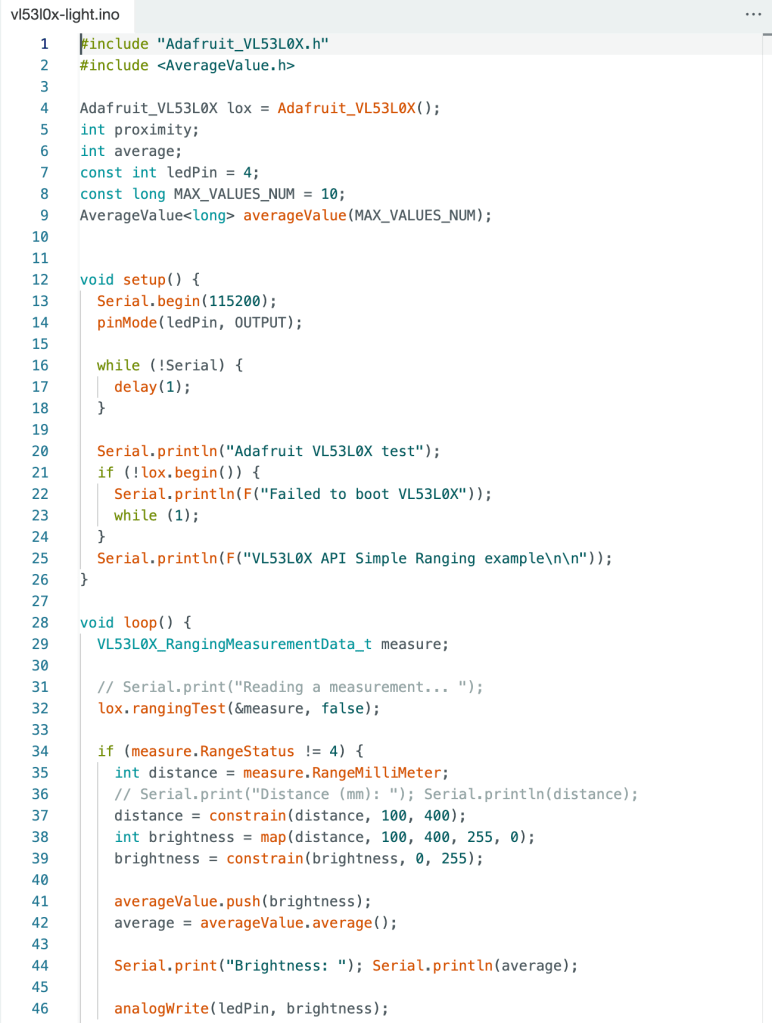
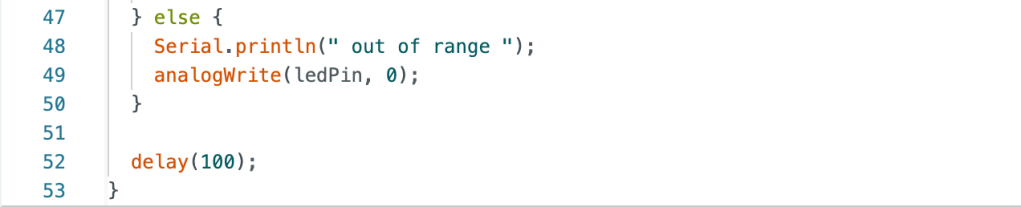
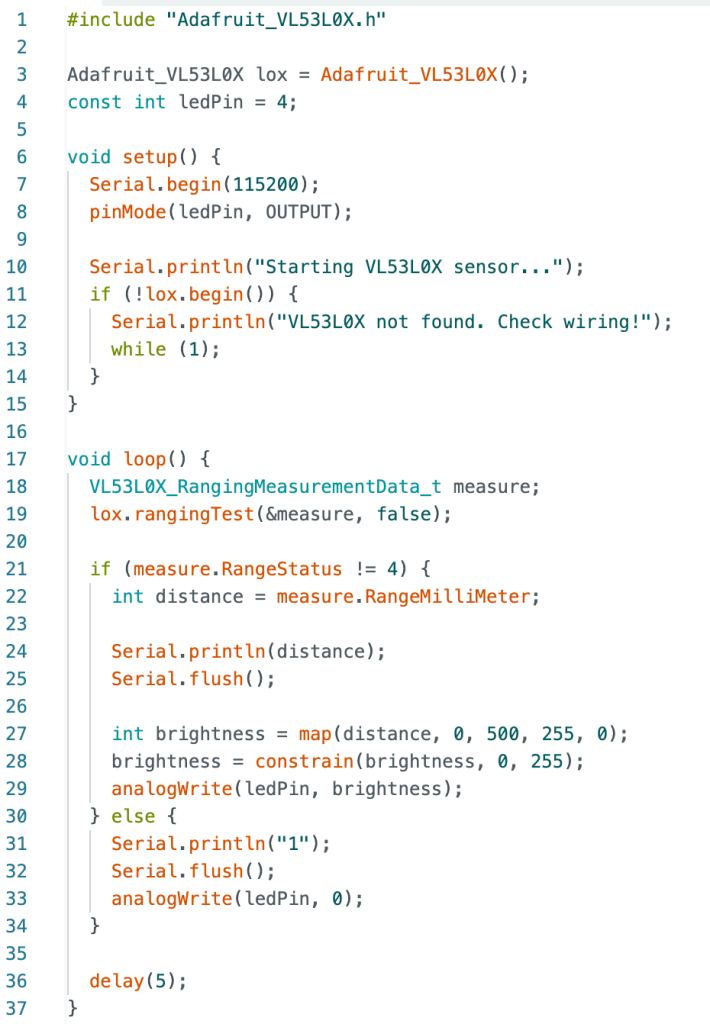
I lost my video of working circuit, but here is my code:
By using the averageValue library, I was able to smooth out the LED brightness changes and make them feel more natural. Instead of instantly reacting to each new distance reading from the sensor, I stored the last 10 brightness values and calculated their average. This way, the LED gradually transitions between brightness levels, avoiding sudden jumps. It makes the visual feedback look much more stable and refined, which is especially important when working with real-world sensor data.
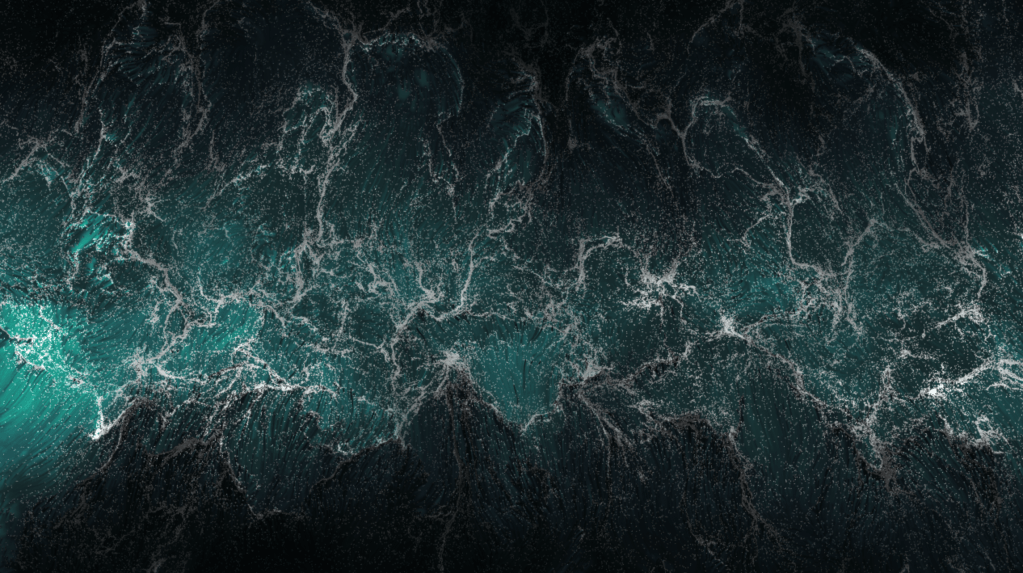
The first time I truly felt recognized and alive was during a trip. I was standing by the ocean, feeling the waves crash against the shore, the wind blowing against my face, and the vastness of the sea stretching endlessly in front of me. In that moment, I felt small but also deeply present, as if the ocean itself acknowledged my existence. It was a powerful feeling—like nothing was impossible.
I wanted to recreate that sensation, to build something that could visually represent the feeling of being recognized and present. My idea was to use a ToF sensor to interact with a dynamic visual, mimicking how the ocean responds to movement.
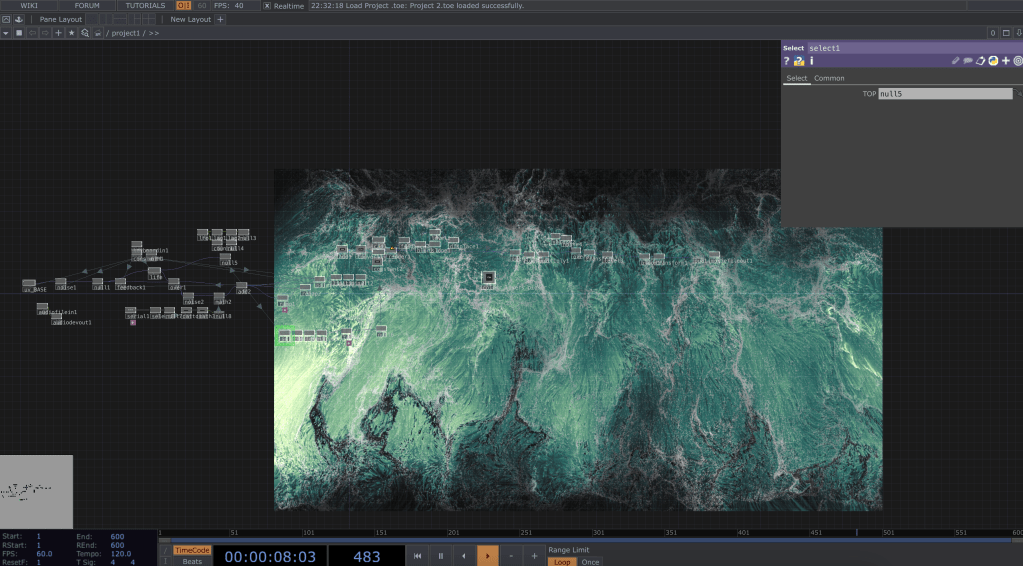
Since this was a quick assignment, I found a Touch Designer Tutorial to make a particle simulation and connected the Arduino to create an ocean simulation that interacts with the hand.
As I moved my hand over the sensor, the waves in the simulation reacted, shifting and changing, just like the real ocean.
Material
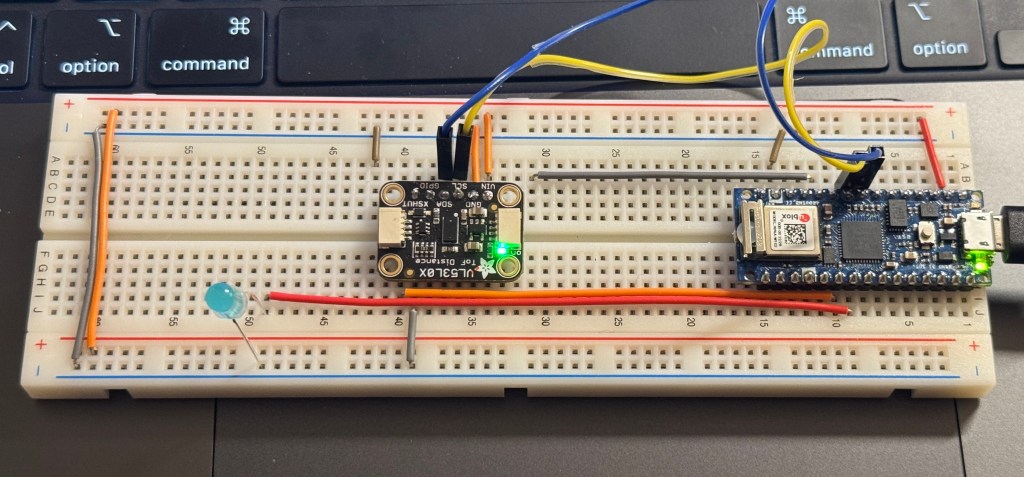
Hardware: VL53L0X ToF sensor, Arduino, LED output
Data Flow: Arduino reads distance → Sends it through Serial → TouchDesigner uses it to control the ocean effect
Interaction: Moving a hand over the sensor changes the waves
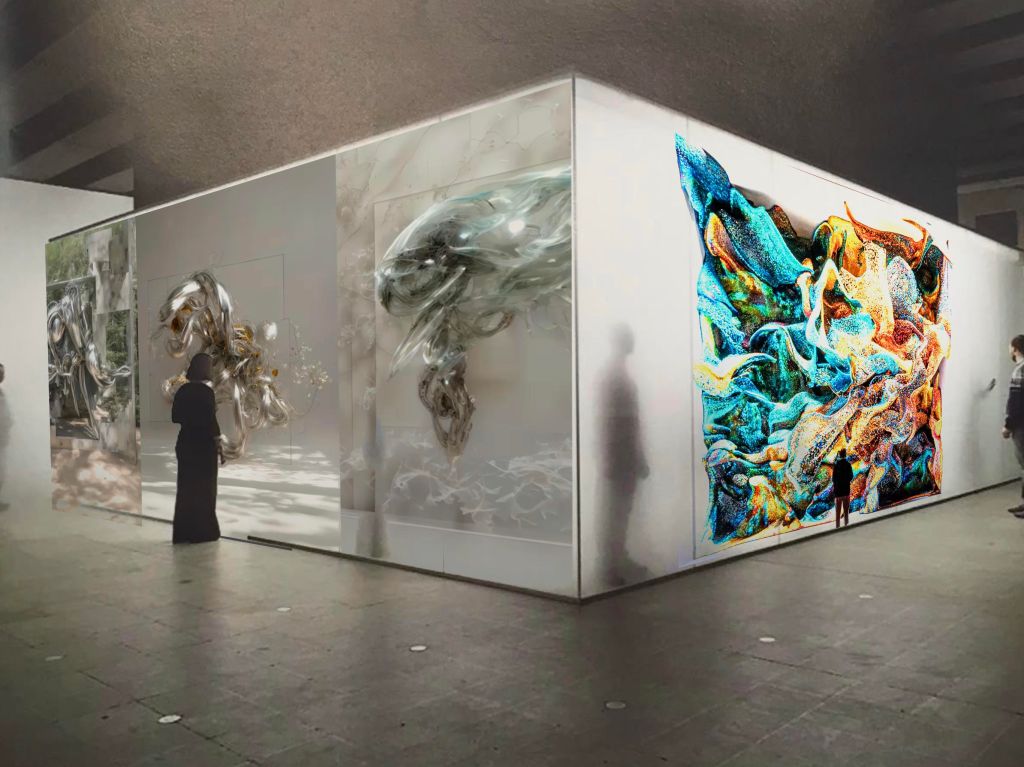
I want to create an exhibition themed around “Flowing Life,” a digital art experience that immerses visitors in a world where motion and technology blur the lines between the organic and the artificial. The exhibition, titled Flowing Life, is inspired by works like Sougwen Chung’s Body Machine Meridians and Refik Anadol’s Coral Dreams. These pieces have always struck me as alive—fluid, organic, and almost breathing. At its core, this exhibition aims to transport viewers into a world where digital creatures flow and evolve, challenging the boundaries between technology and life.
I chose these two projects because they both capture the essence of “flowing life” so perfectly. Sougwen’s work blends human and robotic gestures, creating strokes that feel fluid and meditative, while Refik’s AI-generated coral formations pulse and shift like living, breathing organisms. Though their mediums and techniques differ, they share a common thread—movement, transformation, and a mesmerizing sense of presence.
The exhibition will take place in a large, immersive space where these works will be projected onto massive LED screens, enveloping the audience in waves of motion and color. Paired with a soft, ambient soundscape, the environment will feel calming, almost meditative. I hope visitors will pause, lose themselves in this flowing world, and perhaps even feel a connection to these digital creatures. Ultimately, it’s an invitation to rethink what life means in a world where technology and art intertwine so seamlessly.
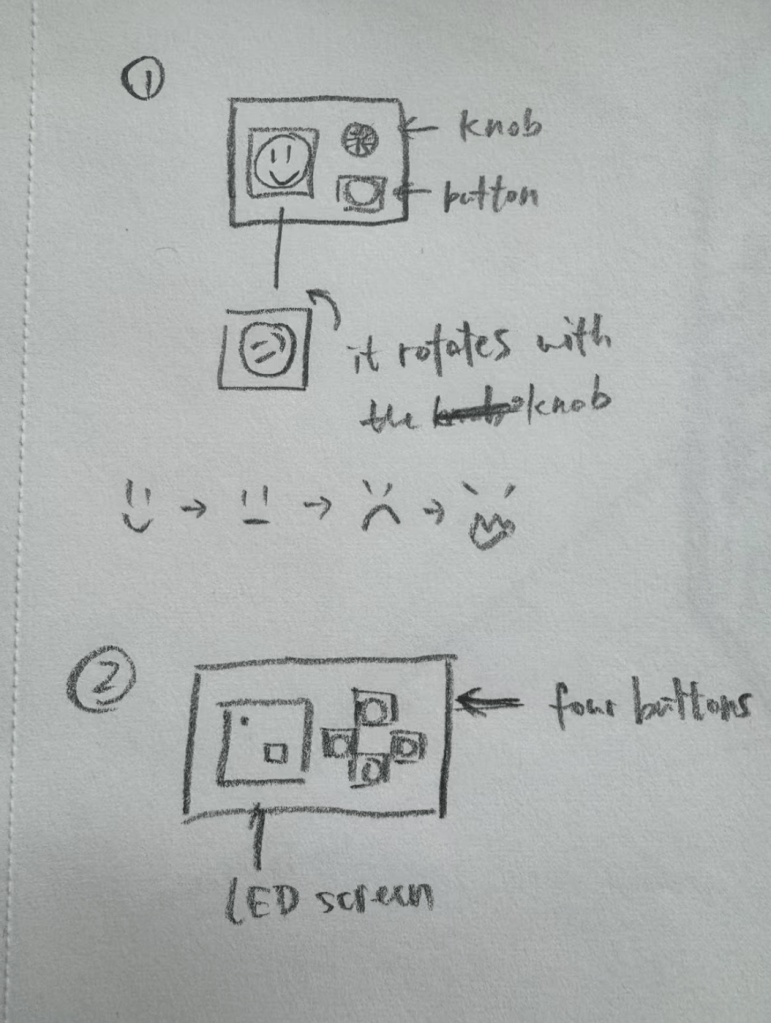
The goal of this project was to create a “mysterious control” that challenges users’ expectations about how buttons function. Initially, I explored two interactive concepts:
A character with emotional reactions—controlled by a knob and button, where turning the knob makes the character angry, and pressing the button makes it happy.
A chaotic movement challenge—where users attempt to guide a dot into a target box on an LED screen using counterintuitive and unpredictable button controls.
After refining these ideas, I chose the second concept but with a physical implementation rather than a digital one in p5.js. To achieve this, I incorporated an LED matrix as the display for the game.
Project Description
This project centers around an LED matrix and four buttons that introduce an unexpected and challenging control scheme. Initially, the concept involved using the buttons for movement, but I later reworked the interactions to leverage short and long presses for varied outcomes. The final design includes a red “X” display for short presses and the originally intended pattern for long presses, along with additional hidden elements for playtesting discovery.
Process & Material
Materials Used:
8×8 LED matrix
Four buttons
Arduino
Supporting wiring and resistors
Development Process:
1. Digital Prototyping in p5.js
While waiting for the LED matrix, I built a digital version in p5.js to test movement mechanics.
Explored how difficult the controls should be to balance engagement and frustration.
Upon receiving the LED matrix, I attempted to transfer the p5.js functionality to the hardware.
Encountered a major issue: the LED display did not visually represent direct movement well.
The dot flashed unpredictably due to unconventional button mappings, making the intended movement unclear.
3. Reworking the Interaction
To maintain the mysterious aspect, I shifted to a short-press/long-press mechanism.
Short press: Displays a red “X.”
Long press: Reveals the originally designed pattern.
Additional surprises were integrated for playtesting exploration.
Challenges & Improvements
The project could be more “mysterious”—currently, the button interactions are still somewhat predictable.
Since the button mechanism is central, the design is constrained by the limited interactions (short press, long press, or multiple buttons together).
A coding issue arose where pressing multiple buttons simultaneously incorrectly triggered the red “X” display. Attempts to restrict this via conditional logic were unsuccessful.
Another exploration – Negative Space of Tapping
Inspired by the concept of negative space, I explored an alternative way to interpret button presses. In this experiment, I reversed the conventional logic of button input: when the button was not pressed, it was considered “pressed,” and when physically pressed, it was considered “not pressed.” This led to an interesting effect—by default, doing nothing meant continuously “holding” the button, while quickly tapping twice within a one-second interval simulated a brief button press. I implemented a small experiment based on this principle to test its feasibility, though it did not fully integrate into the final design.
If the user presses twice quickly (within 1 second), the LED color toggles between blue and red.
If the second press occurs after more than 1 second but within 5 seconds, the LED enters a pulsating gradient mode instead of just switching to a solid color.
After a recent office hours with Fabri, I explored several ideas for an interactive project. Two initial concepts stood out:
A character with emotional reactions – This idea involves a small box with a square LED screen on top, along with a knob and a button. Inside the LED screen, a small character reacts to user input: rotating the knob makes the character turn and become angry, while pressing the button “feeds” it, making it happy.
A chaotic movement challenge – Inspired by a piece showcased at the Winter Show, this concept features a small dot and a target box on an LED screen. Players use four buttons (up, down, left, right) to control the dot, but the controls are deliberately counterintuitive, introducing noise and unexpected movements that make guiding the dot into the box a challenge.
And after refining these ideas, I decided to move forward with the second one but with a twist: instead of a purely digital implementation in p5.js, I wanted to create a more tangible experience. To achieve this, I ordered an LED matrix to serve as the display for the game.
Prototyping in p5.js
While waiting for the LED matrix to arrive, I built a digital prototype in p5.js to test how the interaction would work. The goal was to fine-tune the movement mechanics and explore how challenging (or frustrating) the controls should be to create an engaging experience. Here’s a preview of the effect in action:
My perception of the transformation from tangible to intangible interactions mainly took shape during my high school years when all physical and paper transactions became digital. I moved to the U.S. to study when I was 14 and have only been back to China (where my home is) once in the past few years. There wasn’t a specific moment when I noticed the change, but at some point, I realized just how popular and common digital payments had become. People now use Apple Pay or Alipay (which is like a combination of PayPal and Apple Pay), and there is no longer a need for cash or physical credit cards.
I remember a few years ago when I went back home. My parents and I were heading to a festival market with lots of shops. I was in a rush for dinner and forgot to bring my wallet, so I asked my mom to wait while I ran back to get it. To my surprise, she questioned why I even needed a wallet. At that moment, I suddenly realized that I didn’t need it at all while I was home. The only reason I carried a wallet all the time was because the small town where I attended high school didn’t support Apple Pay in most stores. That was the moment I truly recognized how much the world had changed. Nowadays, even here in New York, very few people carry cash with them. And it’s really making me wonder if tangible interactions with money and cash will eventually disappear altogether.
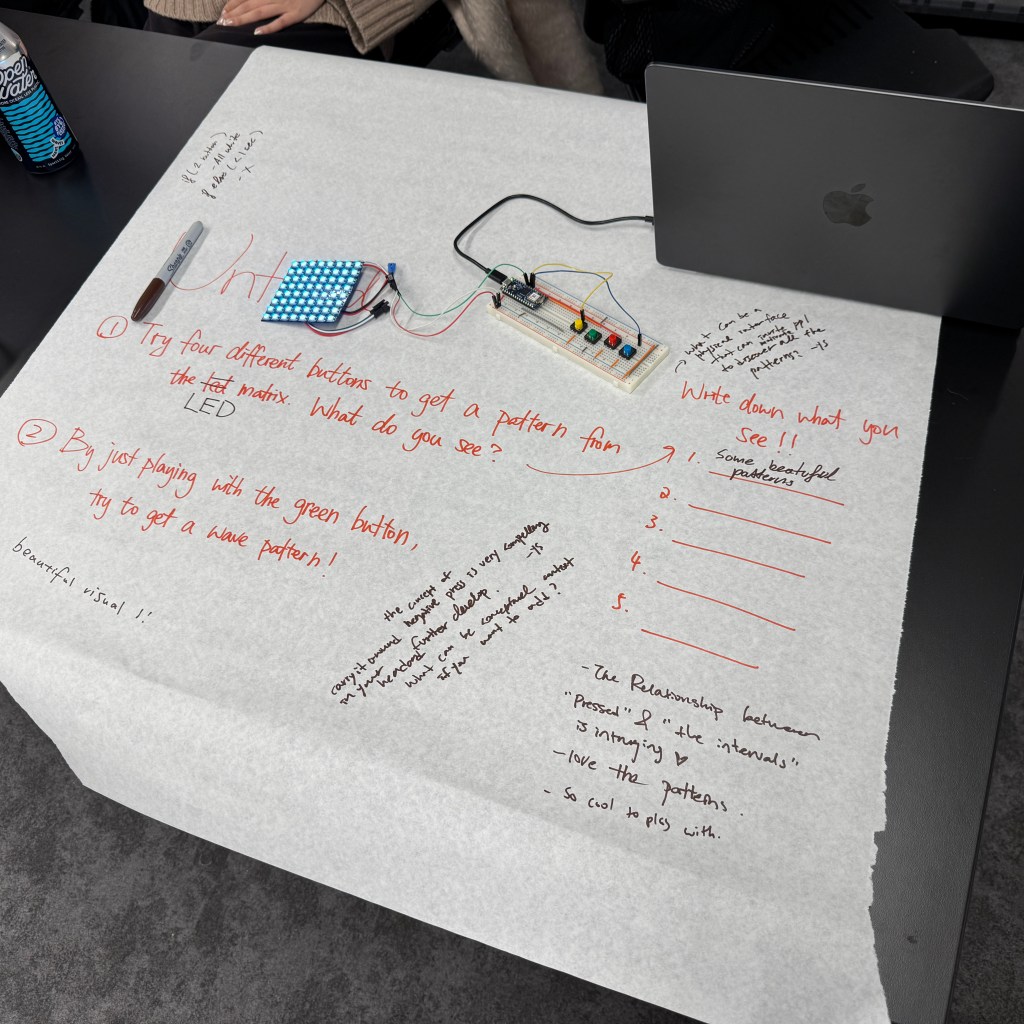
I did the count button presses with the long press, short press. I’ve also review on what is digital sensor and analog sensor with some knowledge about electricity, which helps me to pick up what I left and forgot from creative computing last year.
Project One -Ideation & Sketches
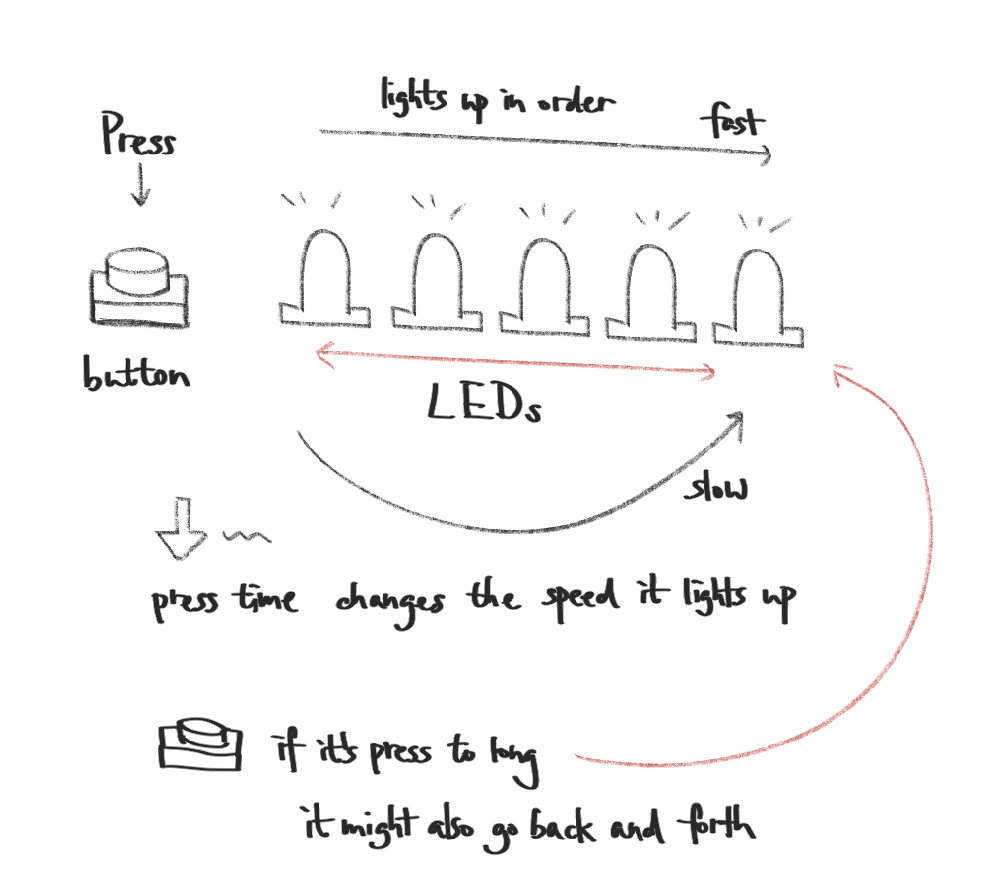
After working on the lab, I was inspired by this short press/long press interaction and wanted to incorporated into my project one. So the idea is that there is ONE button and FIVE(or more) LEDs. The behavior of the LEDs if determined by the duration of the button press. The intention is to create an unpredictable but engaging interaction. Instead of the straightforward your press – the led lights up interaction, it adds a new layer to the button and leds relationship. But it is a bit simple to this point, so I might also consider adding more layers and effects to the original idea.
Here are some basic interaction logic I draw down:
Short Press (<1 sec): When the press time is less than 1 second or it is a tap, the LEDs light up sequentially from left to right in quick succession, creating a smooth flowing effect.
Medium Press (1-3 sec): When the press time is btw 1 and 3 seconds, the LEDs still light up in order, but at a slower pace, increasing the delay between each LED activation.
Long Press (>3 sec): When the press time is more than 3 seconds, the LEDs display a more complex behavior, such as a back-and-forth wave pattern, where the lights move from left to right and then reverse direction.
We believe that connection is more than just shared words—it’s about shared experiences, emotions, and the subtle moments that make us human. While our lives may seem vastly different, we all navigate through a similar spectrum of emotions, like the sharp jolt of pain when you hit your elbow, the uncertainty of what the end of the world might look like, the mixed thrill and discomfort of breaking in a new pair of shoes, or the universal dread of an iPhone alarm ringing too early in the morning.
These seemingly small, everyday experiences make up an emotional language we can all understand, even if we’ve never spoken to each other before. Each person’s life has a unique story to tell, but they are all based on the same emotions, just expressed in different ways. We thought that translating these emotions into visual form in the form of paintings might make it possible to build a speechless bridge between two strangers.
Instructions
Before and During the Game:
Each participant receives a sheet of paper with a blank characteroutline—this blank figure represents a universal person, untouched by individual experiences.
Throughout the day (or within a few minutes in a classroom setting), participants fill in their character with small moments that stood out to them—objects, colors, accessories, clothing details, facial expressions, or abstract symbols representing emotions. As more details are added, the once-generic figure gradually becomes personal, adorned with fragments of experiences that only the creator fully understands.
At the End of the Game:
Each participant exchanges their completed character with their partner.
They take a moment to interpret the other person’s illustration, piecing together glimpses of their day, thoughts, and emotions—trying to understand how the other person experienced the world.
A brief discussion follows: Did they recognize shared experiences? Did they come across something unexpected?


 Anna Chen Blog Post