Category: Interaction as Art Media

  • W5. Mystery Controls (Proj #1) documentation

    Proposal & Inspiration

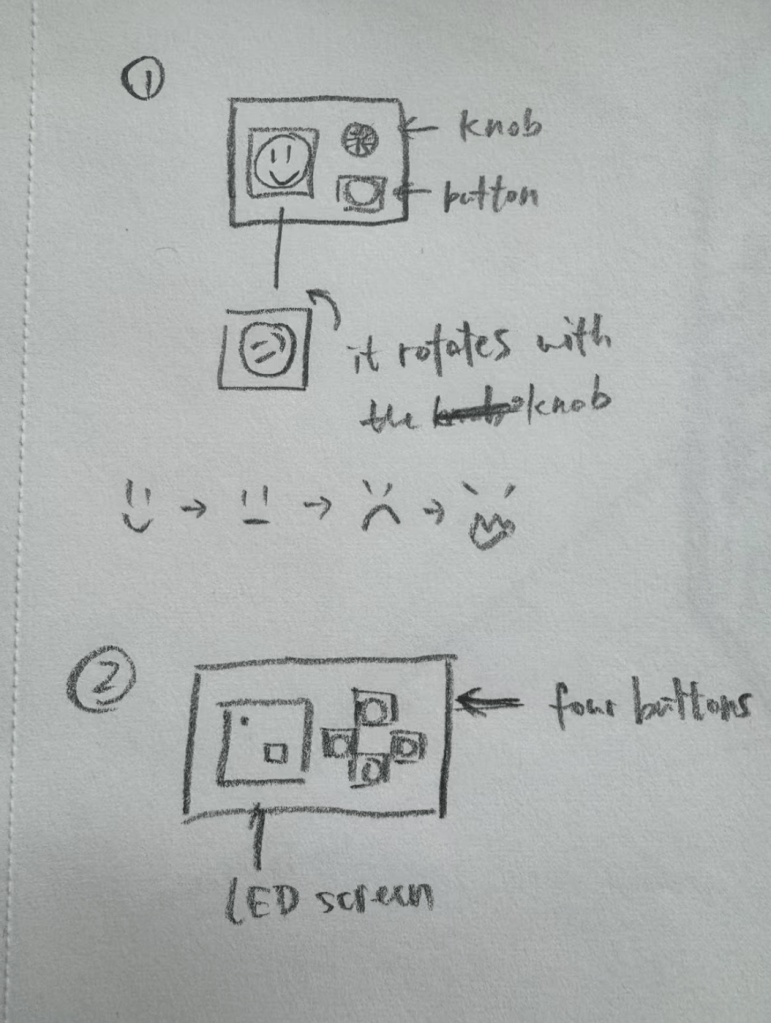
    The goal of this project was to create a “mysterious control” that challenges users’ expectations about how buttons function. Initially, I explored two interactive concepts:

    1. A character with emotional reactions—controlled by a knob and button, where turning the knob makes the character angry, and pressing the button makes it happy.
    2. A chaotic movement challenge—where users attempt to guide a dot into a target box on an LED screen using counterintuitive and unpredictable button controls.

    After refining these ideas, I chose the second concept but with a physical implementation rather than a digital one in p5.js. To achieve this, I incorporated an LED matrix as the display for the game.

    Project Description

    This project centers around an LED matrix and four buttons that introduce an unexpected and challenging control scheme. Initially, the concept involved using the buttons for movement, but I later reworked the interactions to leverage short and long presses for varied outcomes. The final design includes a red “X” display for short presses and the originally intended pattern for long presses, along with additional hidden elements for playtesting discovery.

    Process & Material

    Materials Used:

    • 8×8 LED matrix
    • Four buttons
    • Arduino
    • Supporting wiring and resistors

    Development Process:

    1. Digital Prototyping in p5.js

    • While waiting for the LED matrix, I built a digital version in p5.js to test movement mechanics.
    • Explored how difficult the controls should be to balance engagement and frustration.
    • Link to p5.js prototype.

    2. Physical Implementation

    • Upon receiving the LED matrix, I attempted to transfer the p5.js functionality to the hardware.
    • Encountered a major issue: the LED display did not visually represent direct movement well.
    • The dot flashed unpredictably due to unconventional button mappings, making the intended movement unclear.

    3. Reworking the Interaction

    • To maintain the mysterious aspect, I shifted to a short-press/long-press mechanism.
    • Short press: Displays a red “X.”
    • Long press: Reveals the originally designed pattern.
    • Additional surprises were integrated for playtesting exploration.

    Challenges & Improvements

    • The project could be more “mysterious”—currently, the button interactions are still somewhat predictable.
    • Since the button mechanism is central, the design is constrained by the limited interactions (short press, long press, or multiple buttons together).
    • A coding issue arose where pressing multiple buttons simultaneously incorrectly triggered the red “X” display. Attempts to restrict this via conditional logic were unsuccessful.

    Another exploration – Negative Space of Tapping

    Inspired by the concept of negative space, I explored an alternative way to interpret button presses. In this experiment, I reversed the conventional logic of button input: when the button was not pressed, it was considered “pressed,” and when physically pressed, it was considered “not pressed.” This led to an interesting effect—by default, doing nothing meant continuously “holding” the button, while quickly tapping twice within a one-second interval simulated a brief button press. I implemented a small experiment based on this principle to test its feasibility, though it did not fully integrate into the final design.

    • If the user presses twice quickly (within 1 second), the LED color toggles between blue and red.
    • If the second press occurs after more than 1 second but within 5 seconds, the LED enters a pulsating gradient mode instead of just switching to a solid color.
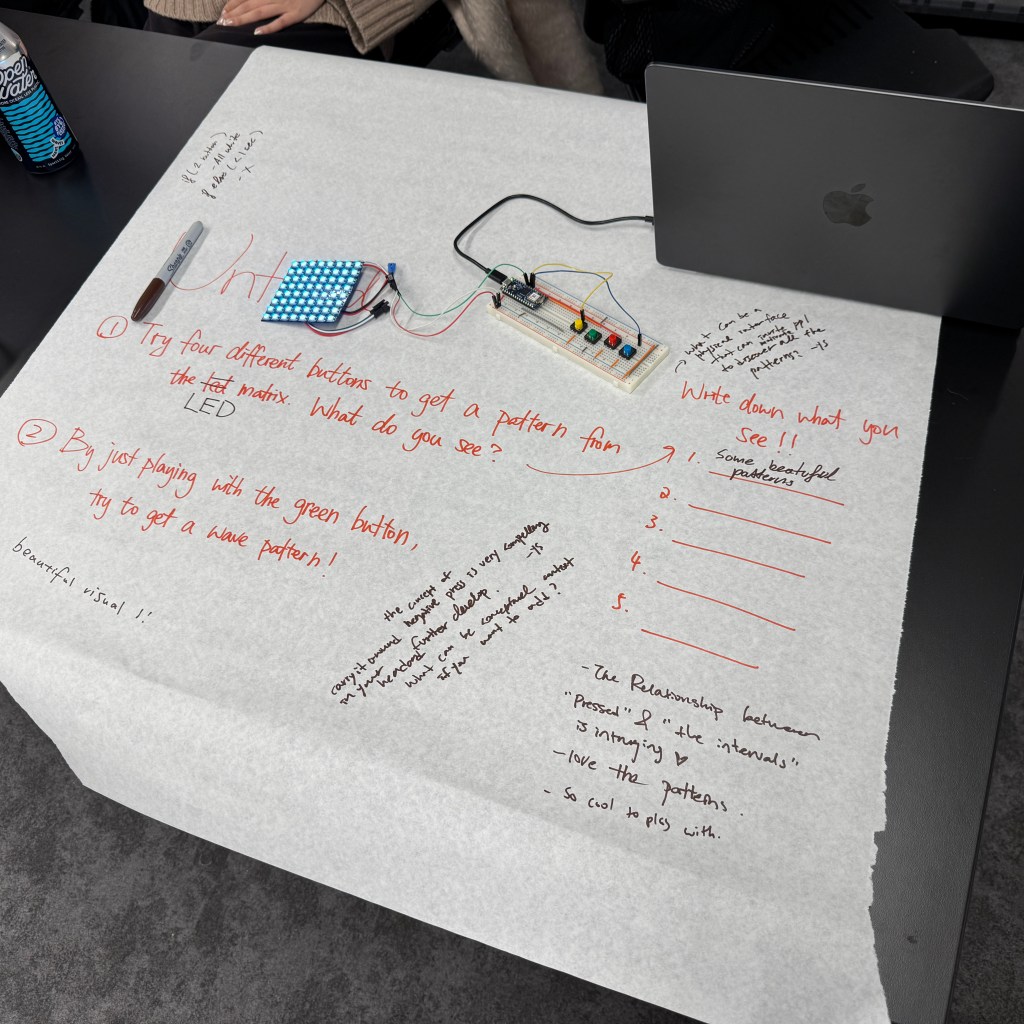
    Playtest Notes
  • W4. Mystery Controls (Proj #1) planning & process

    After a recent office hours with Fabri, I explored several ideas for an interactive project. Two initial concepts stood out:

    1. A character with emotional reactions – This idea involves a small box with a square LED screen on top, along with a knob and a button. Inside the LED screen, a small character reacts to user input: rotating the knob makes the character turn and become angry, while pressing the button “feeds” it, making it happy.
    2. A chaotic movement challenge – Inspired by a piece showcased at the Winter Show, this concept features a small dot and a target box on an LED screen. Players use four buttons (up, down, left, right) to control the dot, but the controls are deliberately counterintuitive, introducing noise and unexpected movements that make guiding the dot into the box a challenge.

    And after refining these ideas, I decided to move forward with the second one but with a twist: instead of a purely digital implementation in p5.js, I wanted to create a more tangible experience. To achieve this, I ordered an LED matrix to serve as the display for the game.

    Prototyping in p5.js

    While waiting for the LED matrix to arrive, I built a digital prototype in p5.js to test how the interaction would work. The goal was to fine-tune the movement mechanics and explore how challenging (or frustrating) the controls should be to create an engaging experience. Here’s a preview of the effect in action:

    Here is the link toward p5.js: https://editor.p5js.org/xc2736/sketches/elosDLYjL

  • W3. Tangible/Intangible(Extra Credit)

    My perception of the transformation from tangible to intangible interactions mainly took shape during my high school years when all physical and paper transactions became digital. I moved to the U.S. to study when I was 14 and have only been back to China (where my home is) once in the past few years. There wasn’t a specific moment when I noticed the change, but at some point, I realized just how popular and common digital payments had become. People now use Apple Pay or Alipay (which is like a combination of PayPal and Apple Pay), and there is no longer a need for cash or physical credit cards.

    I remember a few years ago when I went back home. My parents and I were heading to a festival market with lots of shops. I was in a rush for dinner and forgot to bring my wallet, so I asked my mom to wait while I ran back to get it. To my surprise, she questioned why I even needed a wallet. At that moment, I suddenly realized that I didn’t need it at all while I was home. The only reason I carried a wallet all the time was because the small town where I attended high school didn’t support Apple Pay in most stores. That was the moment I truly recognized how much the world had changed. Nowadays, even here in New York, very few people carry cash with them. And it’s really making me wonder if tangible interactions with money and cash will eventually disappear altogether.

  • W3. Button & Knobs

    I did the count button presses with the long press, short press. I’ve also review on what is digital sensor and analog sensor with some knowledge about electricity, which helps me to pick up what I left and forgot from creative computing last year.

    Project One -Ideation & Sketches

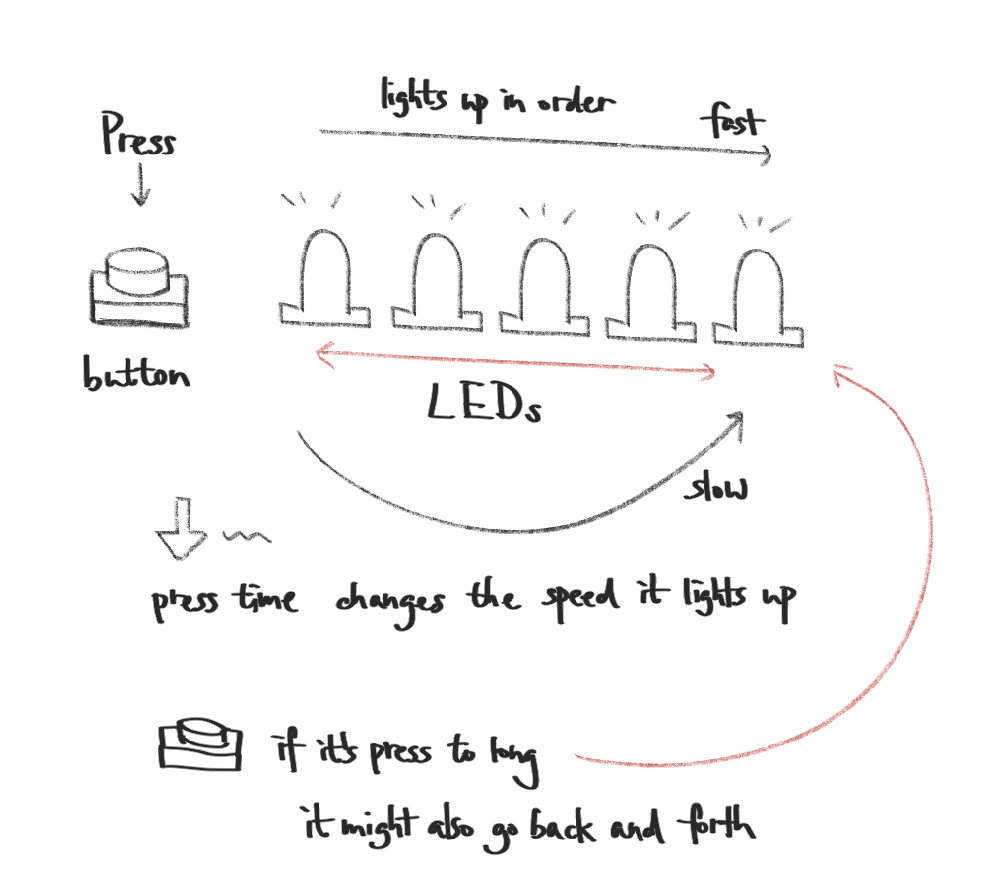
    After working on the lab, I was inspired by this short press/long press interaction and wanted to incorporated into my project one. So the idea is that there is ONE button and FIVE(or more) LEDs. The behavior of the LEDs if determined by the duration of the button press. The intention is to create an unpredictable but engaging interaction. Instead of the straightforward your press – the led lights up interaction, it adds a new layer to the button and leds relationship. But it is a bit simple to this point, so I might also consider adding more layers and effects to the original idea.

    Here are some basic interaction logic I draw down:

    Short Press (<1 sec): When the press time is less than 1 second or it is a tap, the LEDs light up sequentially from left to right in quick succession, creating a smooth flowing effect.

    Medium Press (1-3 sec): When the press time is btw 1 and 3 seconds, the LEDs still light up in order, but at a slower pace, increasing the delay between each LED activation.

    Long Press (>3 sec): When the press time is more than 3 seconds, the LEDs display a more complex behavior, such as a back-and-forth wave pattern, where the lights move from left to right and then reverse direction.

  • W2. Hello Stranger – Anshula & Anna

    How Do We Get to Know Each Other?

    We believe that connection is more than just shared words—it’s about shared experiences, emotions, and the subtle moments that make us human. While our lives may seem vastly different, we all navigate through a similar spectrum of emotions, like the sharp jolt of pain when you hit your elbow, the uncertainty of what the end of the world might look like, the mixed thrill and discomfort of breaking in a new pair of shoes, or the universal dread of an iPhone alarm ringing too early in the morning.

    These seemingly small, everyday experiences make up an emotional language we can all understand, even if we’ve never spoken to each other before. Each person’s life has a unique story to tell, but they are all based on the same emotions, just expressed in different ways. We thought that translating these emotions into visual form in the form of paintings might make it possible to build a speechless bridge between two strangers.

    1. Before and During the Game:
      • Each participant receives a sheet of paper with a blank character outline—this blank figure represents a universal person, untouched by individual experiences.
      • Throughout the day (or within a few minutes in a classroom setting), participants fill in their character with small moments that stood out to them—objects, colors, accessories, clothing details, facial expressions, or abstract symbols representing emotions. As more details are added, the once-generic figure gradually becomes personal, adorned with fragments of experiences that only the creator fully understands.
    2. At the End of the Game:
      • Each participant exchanges their completed character with their partner.
      • They take a moment to interpret the other person’s illustration, piecing together glimpses of their day, thoughts, and emotions—trying to understand how the other person experienced the world.
      • A brief discussion follows: Did they recognize shared experiences? Did they come across something unexpected?
    Blank Character Outline (Sourced Online)
  • W1. The Cat System – Anna & Kyra

    Kyra and I are both cat people. We then come up with this interaction and system with our cat when we go back to home—-the cat welcoming! 

    Imagine going back to your home after a day of working or studying:

    1. The cat sitting at home waiting for you to come back
    2. You come home, cat is still in the background to the person
    3. The cat approaches you
    4. As you pet your cat, the cat seeks more attention

    The reason why we chose this system is because we both have cats. There are multiple ways to interact with our cats, including petting, feeding, speaking and smelling, as well as interaction from the cat in return; these interactions are mutual between the person and the cat. Since people have special bonds with their pets (not just cats), when interacting with them, it provides more than just momentary reactions and emotions. While these interactions are fleeting in the physical space, the emotional memory stays for a lot longer. When petting a cat, for example, the experience goes beyond the physical sensation of soft fur under the hand. It elicits a sense of comfort, warmth, and connection that resonates deeply, creating a calming and fulfilling emotional response.