Proposal & Inspiration
The goal of this project was to create a “mysterious control” that challenges users’ expectations about how buttons function. Initially, I explored two interactive concepts:
- A character with emotional reactions—controlled by a knob and button, where turning the knob makes the character angry, and pressing the button makes it happy.
- A chaotic movement challenge—where users attempt to guide a dot into a target box on an LED screen using counterintuitive and unpredictable button controls.
After refining these ideas, I chose the second concept but with a physical implementation rather than a digital one in p5.js. To achieve this, I incorporated an LED matrix as the display for the game.
Project Description
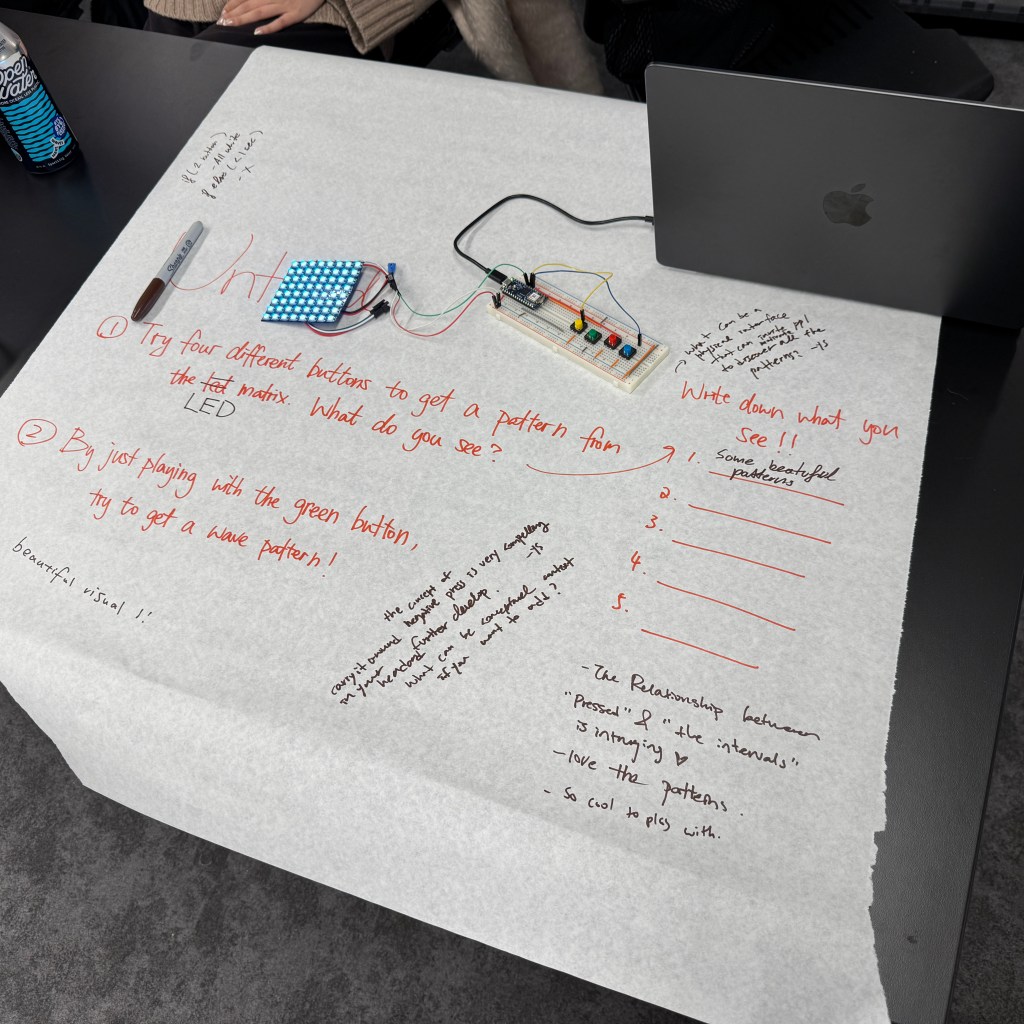
This project centers around an LED matrix and four buttons that introduce an unexpected and challenging control scheme. Initially, the concept involved using the buttons for movement, but I later reworked the interactions to leverage short and long presses for varied outcomes. The final design includes a red “X” display for short presses and the originally intended pattern for long presses, along with additional hidden elements for playtesting discovery.
Process & Material
Materials Used:
- 8×8 LED matrix
- Four buttons
- Arduino
- Supporting wiring and resistors
Development Process:
1. Digital Prototyping in p5.js
- While waiting for the LED matrix, I built a digital version in p5.js to test movement mechanics.
- Explored how difficult the controls should be to balance engagement and frustration.
- Link to p5.js prototype.
2. Physical Implementation
- Upon receiving the LED matrix, I attempted to transfer the p5.js functionality to the hardware.
- Encountered a major issue: the LED display did not visually represent direct movement well.
- The dot flashed unpredictably due to unconventional button mappings, making the intended movement unclear.
3. Reworking the Interaction
- To maintain the mysterious aspect, I shifted to a short-press/long-press mechanism.
- Short press: Displays a red “X.”
- Long press: Reveals the originally designed pattern.
- Additional surprises were integrated for playtesting exploration.
Challenges & Improvements
- The project could be more “mysterious”—currently, the button interactions are still somewhat predictable.
- Since the button mechanism is central, the design is constrained by the limited interactions (short press, long press, or multiple buttons together).
- A coding issue arose where pressing multiple buttons simultaneously incorrectly triggered the red “X” display. Attempts to restrict this via conditional logic were unsuccessful.
Another exploration – Negative Space of Tapping
Inspired by the concept of negative space, I explored an alternative way to interpret button presses. In this experiment, I reversed the conventional logic of button input: when the button was not pressed, it was considered “pressed,” and when physically pressed, it was considered “not pressed.” This led to an interesting effect—by default, doing nothing meant continuously “holding” the button, while quickly tapping twice within a one-second interval simulated a brief button press. I implemented a small experiment based on this principle to test its feasibility, though it did not fully integrate into the final design.
- If the user presses twice quickly (within 1 second), the LED color toggles between blue and red.
- If the second press occurs after more than 1 second but within 5 seconds, the LED enters a pulsating gradient mode instead of just switching to a solid color.
 Anna Chen Blog Post